
Bug unable to enter any rooms

Dream_Weaver

Resident
FCN Regular
Which device and model are you using?
Dell Laptop
Which OS and version are you using?
11th Gen Intel(R) Core(TM) i7-1185G7 @ 3.00GHz (1.80 GHz)
How are you connecting?
WIFi
Which web browser and version are you using?
Chrome or Edge
Are you using special settings or extensions?
no
Did you update your software recently?
Yes
What is the error message you're seeing?
I'm not getting a error message, I'm just unable to log into any rooms
Have you attempted any troubleshooting?
Yes. I've rebooted, updated the system, cleared cache
I am able to log into the system on my HP laptop and everything is fine. Since late last night, I cannot log into a chat room on my Dell laptop. I can get into FCN, but when I try to enter a room, nothing happens. I can see my Friends list, but no rooms.
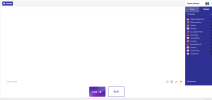
 

Attachments

  • screenshot 2026-10-30.png
    screenshot 2026-10-30.png
    92.6 KB · Views: 2
How are you trying to enter the rooms? What is the full URL in the address bar? What type of WiFi? Which path do you take to enter chat? You entered hardware specs instead of OS version.
 
Same situation here: no access path to the chatroom seems to work: I've tried entering from main site, via a saved url path in the browser, and it's just ain't workin'. Below is the full URL of what I get when I log in. And then, it's just blank. Friends' list is in place, but everyone's offline.

That's what appears in the URL after username and ?: "time=1793392047&sig=a4a4c79834234b6fe2a501e2987e5afce79068a7c1c4781a3aae9605bccb1bc6"
 
How are you trying to enter the rooms? What is the full URL in the address bar? What type of WiFi? Which path do you take to enter chat? You entered hardware specs instead of OS version.
The OS is Windows 11 Pro. It worked Thursday afternoon, then Thursday evening it didn't. I've tried entering a room from the login screen, then double clicking a room off the drop down list. The URL is in the top of the previous attachment.
It's the same Wi-Fi I've used at the house for several years and the Wi-Fi at the office. Neither of them work with this computer, but I can still access it with a different computer on the same Wi-Fi.
 
The OS is Windows 11 Pro. It worked Thursday afternoon, then Thursday evening it didn't. I've tried entering a room from the login screen, then double clicking a room off the drop down list. The URL is in the top of the previous attachment.
It's the same Wi-Fi I've used at the house for several years and the Wi-Fi at the office. Neither of them work with this computer, but I can still access it with a different computer on the same Wi-Fi.
I also reset the Chrome browser to no avail. I attempted to send the URL in here, but I got a message of spam-like material and it wouldn't let me send it. Any help would be appreciated.
 
Same situation here as well. Can log in. When selecting a chat room, dialogue says you're logging in, you can see the screen as if you're in. But no chat room appears. Same as others on the thread, appears to have happened around the same time, a few days ago. You can select "Room" and see the rooms with number of people. But the rooms do not open. URL will either say: schat.freechatnow.com/room/"Room name"
or will have the user name in with date and time and other characters as described. I have visited a similar site with a very similar look, joined as a member, and can enter the chat rooms there.
 
I'm in the same position here. It went from working fine to suddenly just a white screen, showing only the options of users and friends in the upper right corner and the Rooms button in the upper left corner. For this being a multiple member issue it has to be something on the end of FCN and not users with the issue. I've also tried on different devices, and it's not working. Switching of browsers hasn't changed anything. Clearing history and browser cache changed nothing.
 
Yep same been happening for 2 or 3 days now cant access any rooms, I dont feel like this is being taken seriously as it seems a number of people basically cant use the site for anything hopefully it gets fixed soon
 
i have the same problem. The other day i was think the problem was from google chrome because when i tried in firefox can use the chat normally. but yesterday i vever can use the site anyways. Im a PC user and i hope good news about the fixing.
a last doubt, in my celphone from android the site run normally, so all people here with this problem is in a windows OS on Pc?
 

Trending content

Back
Top